
 5 MIN READ
 UPDATED OCT 30, 2026
📘 For organization administrators on Toku. Last updated October 30, 2026.
Bonuses and other additional payments of $5,000 USD or more are held for Toku review before they reach payroll. Additional payments over $5,000 USD require pre-funding; Toku Billing confirms the funding requirement for held entries. This page explains what triggers the hold, what you see on the profile once it happens, and what comes next.
Before you start
- You need administrator access to your organization on Toku.
- This page is about additional compensation - bonuses, stipends, correction payments, overtime and additional final pay. Changing someone's base salary works differently and is not held by this rule.
- Every entry needs an effective date. This determines when the change can take effect; the actual payment date depends on the eligible payroll cycle, approval, and required funding.
What gets held for review
- Any additional compensation entry worth $5,000 USD or more. Amounts in other currencies are converted to US dollars first, so the same limit applies wherever the person is paid.
- Any entry paid in a token, whatever the amount. Toku does not put an automatic dollar value on a token, so these always go to review.
- Any entry Toku cannot value in dollars - for example, changing what an existing entry is paid in without re-entering the amount.
💡 Two things are never held: removing an entry, and editing only its note or how often it repeats.
Add the payment
- Open People in the left-hand menu, select the person's name to open their profile, and scroll to the Compensation section.
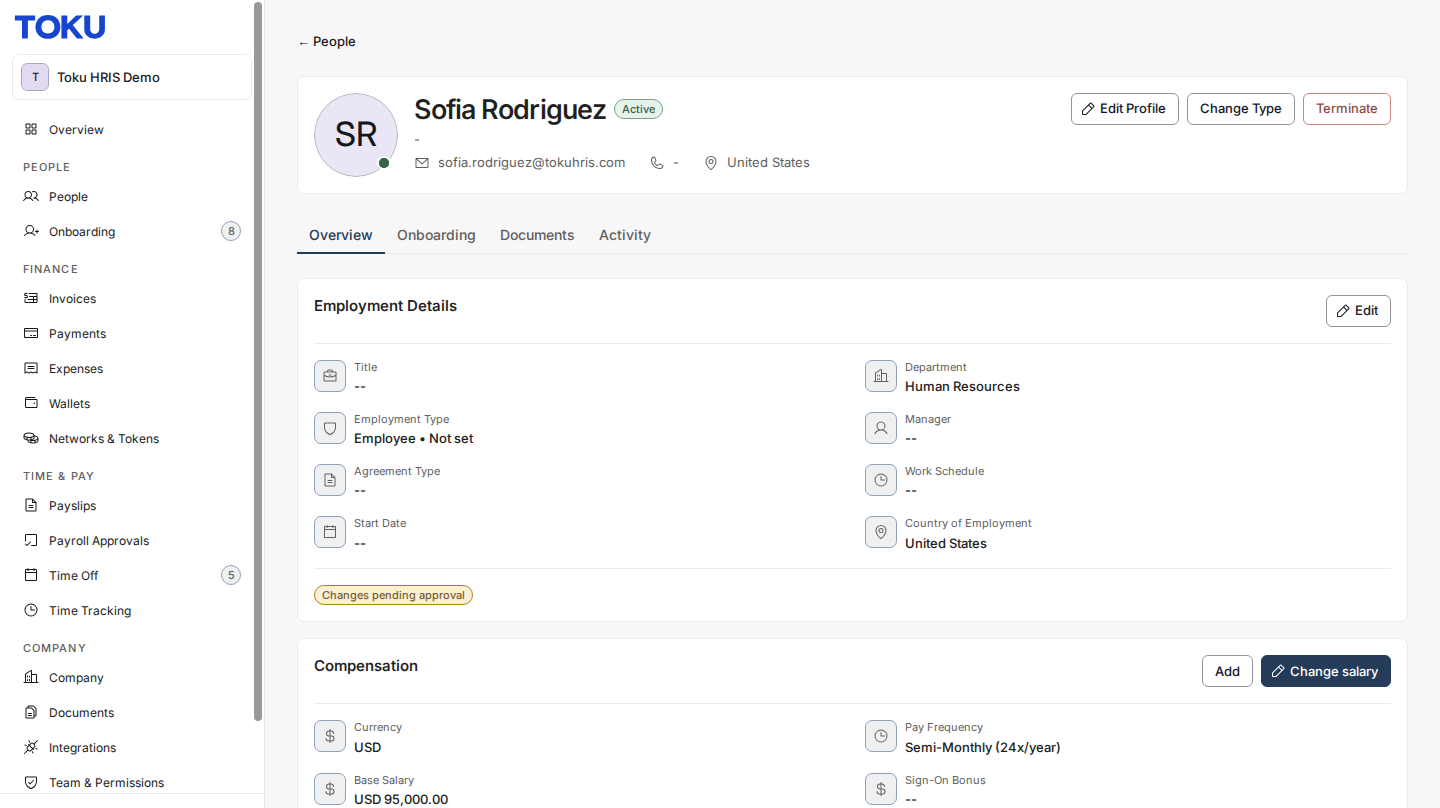
- Select Add. The Add Additional Compensation window opens.
- Enter the Amount, pick the Currency, choose the Type and the Schedule, and set the Effective Date. If the payment is worth more than $5,000 USD, a prefunding notice appears above Add.
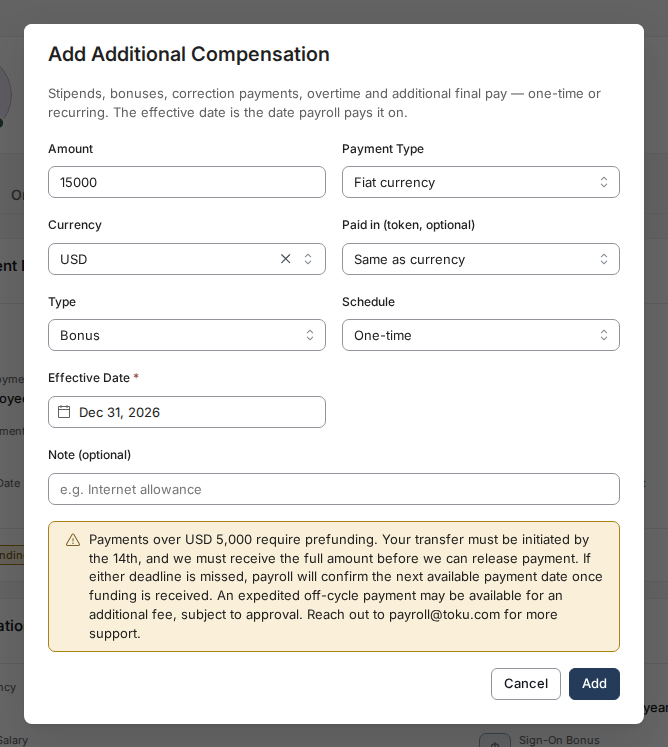
- Select Add. A confirmation reads "Additional compensation added".
What a held payment looks like
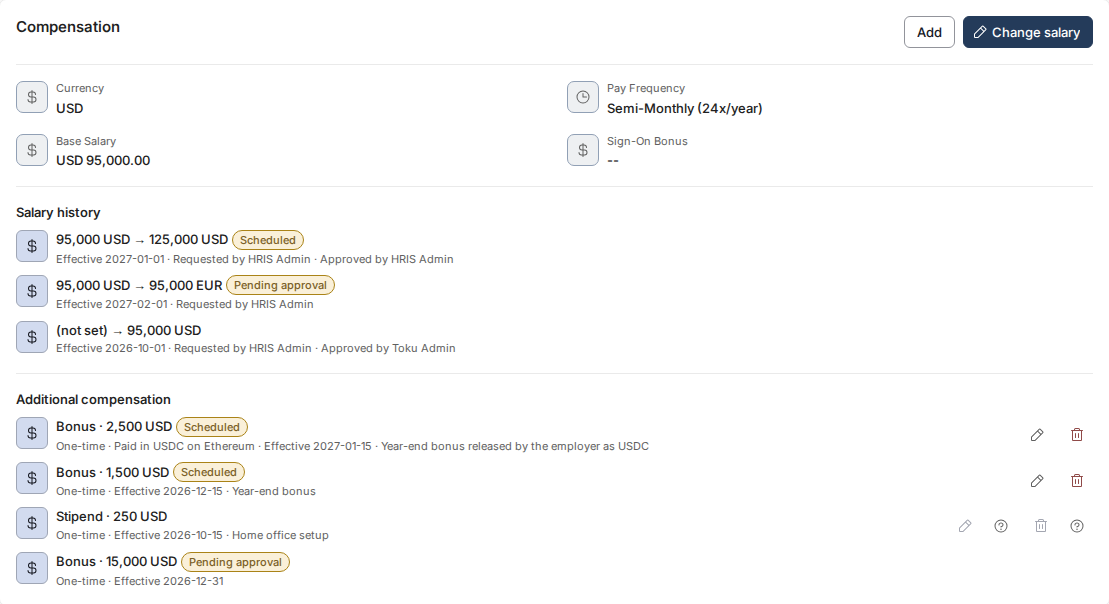
A held entry does not join the list of additional compensation straight away. The Compensation section shows it as its own row with a Pending approval tag, together with the type, the amount and the schedule you entered.
Employee pre-funding deadlines
These requirements apply to EOR, PEO, and payroll-only employee payrolls. Contractor invoice and funding deadlines are separate.
- Submit by the 10th: Enter complete payroll changes and the payment details needed for invoicing in Toku by the 10th of the month for consideration in that month's payroll.
- Invoice on the 11th or next business day: Toku reviews changes submitted by the 10th and sends admins the required pre-funding invoices on the 11th, or the next business day.
- Send payment by the 14th: Initiate payment of the full pre-funding invoice by the 14th of the month, allowing enough time for banking and clearance.
- Funds received and cleared by the 18th: Toku must receive and clear the full required pre-funding by the 18th of the month. If the 18th falls on a weekend, the receipt deadline moves to the next working day. Initiating a transfer or sending proof of payment does not confirm receipt.
- Payroll inclusion depends on receipt: An on-time submission or transfer alone does not secure the payroll cycle. If required funding is not received and cleared by the 18th, the additional payment moves to the next eligible regular payroll cycle, subject to funding being received in time for that cycle. Payroll will notify your admin if the payment is delayed. An off-cycle request requires separate confirmation and may carry fees. These dates apply whenever employee pre-funding is required, including bonuses, other additional compensation, and termination or severance payments. Additional employee payments over $5,000 USD require pre-funding. The platform's documented review hold starts at $5,000 USD or more; a hold is not confirmation of funding or payroll inclusion. Toku Billing confirms the funding requirement for a held entry.
For semi-monthly payrolls or earlier paydays, the applicable earlier payroll and processing cutoffs still apply. The monthly submission, payment-sending, and receipt deadlines do not guarantee a mid-month payment or extend an earlier cutoff. Plan transfers around weekends and holidays so funds clear by the 18th. For November and December, the published holiday deadlines in the Payroll Calendar take precedence.
Example: September bonus
A $10,000 bonus submitted on September 8 for the September 30 monthly payroll meets the submission deadline. Toku sends the pre-funding invoice on September 11. The client must send payment by September 14, and Toku must receive and clear the full amount by September 18. If funds clear after September 18, the bonus moves to the next eligible regular cycle, October 30 for this monthly-payroll example, provided funding is received in time for that cycle. Semi-monthly schedules may have a different next eligible date.
What happens next
- Toku's billing team is notified when the request is created, so the amount can be prefunded.
- The entry stays pending until a Toku administrator approves it. Until then it is not in effect and payroll does not pay it.
- Payroll is notified of every compensation change, held or not.
Good to know
- The Add Additional Compensation window shows a prefunding notice above Add when the payment is worth more than $5,000 USD. The review hold itself only becomes visible afterwards, as the Pending approval tag on the Compensation section.
- The limit applies to each entry on its own, not to a running total for the month.
- A recurring entry also goes to Toku's billing team even when it is under $5,000, because it raises ongoing pay.
- To record a payment in a token rather than a currency, see Paying Additional Compensation in Tokens.
Still stuck?
You can email customer-success@toku.com to reach our support team. Please include your email address, organization name, the employee's name, and the amount and effective date you entered.