
 1 MIN READ
 UPDATED NOV 6, 2026
For administrators on Toku Employment and Contractors. Last updated November 6, 2026.
Use Needs your attention to find tracked items that need your review. Employment administrators can find the list on Overview. Eligible contractor-only administrators can find invoice items on People.
Before you start
Sign in as an administrator with access to the relevant dashboard and items. What you see depends on your access and the people you can manage. If an item or destination is not available, ask your administrator to check your permissions.
Review an item
- Open Overview in Employment, or People for a contractor-only account, and find Needs your attention.
- Read the item and its count. Select Review beside an item to open the relevant page.
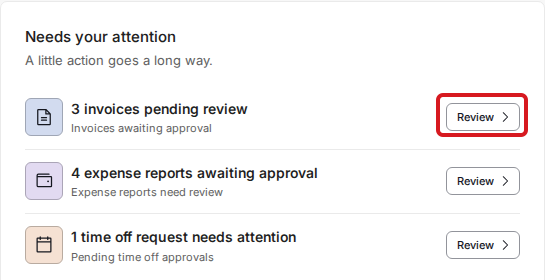
For contractor-only accounts, invoice items appear on People:

- Review the details on the destination page and use its available actions to resolve the task. For example, an invoice awaiting approval opens the invoice list filtered to pending invoices.
Good to know
The list shows tracked items that your access permits. It is not a complete list of every task in Toku, so check the relevant pages for other work. Opening an item does not itself approve an invoice or move funds.
Still stuck?
Contact customer-success@toku.com for help.