
 2 MIN READ
 UPDATED NOV 5, 2026
For admins on Toku HR. Last updated November 5, 2026.
Each employee's profile lists their documents on the Documents tab. Next to every document, two small badges show who can see it: the employee, your organization's admins, both, or neither. You no longer need to sign in as the employee to check.
Before you start
- You need to be an admin in your organization who can open employee profiles.
- The badges show who can see a document. If you need to change access, contact the Toku team.
Check who can see a document
- Go to People and open the employee's profile.
- Select the Documents tab.
- Find the document and look at the two badges on the right of its row. The person badge is the Employee. The building badge is your Org Admins.
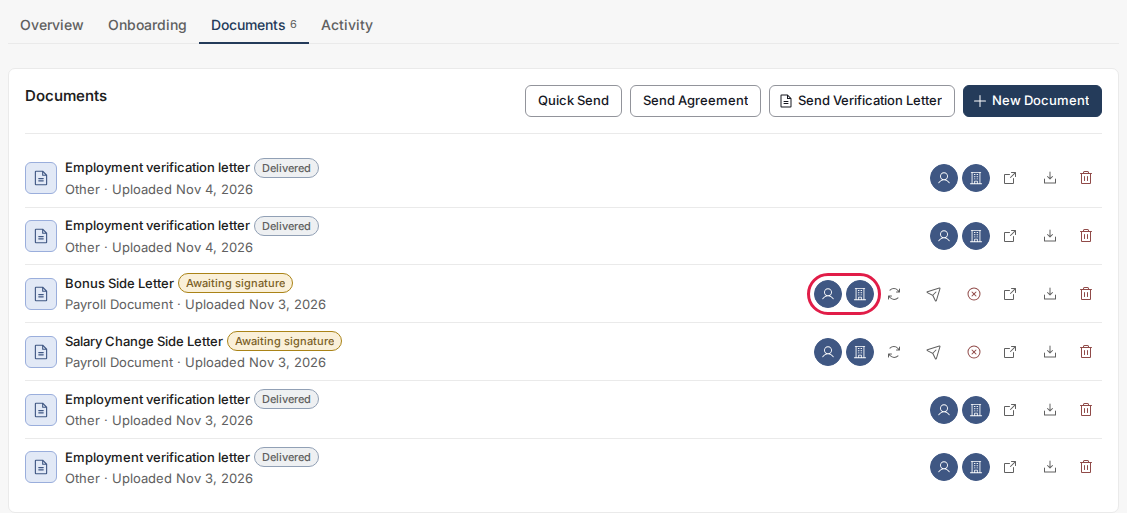
- Read the badges:
- A filled badge means that audience can see the document.
- An outlined ring means that audience can't see it.
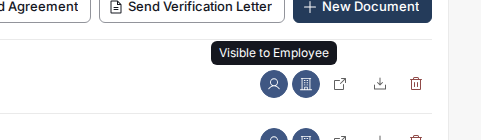
- To check a badge, point at it. Its label says, for example, Visible to Employee or Hidden from Org Admin.
What the combinations mean
- Both filled: the employee and your admins can see the document.
- Only the person badge filled: the employee can see it, but your admins cannot. Identity and tax documents are restricted from client admins by default; the Toku team can change access for an individual document.
- Only the building badge filled: only your admins can see it. The employee doesn't see it on their own Documents page.
- Both outlined: only the Toku team can see it.
Good to know
- A document sent to the employee for signature counts as visible to them while it waits for their signature, because it shows on their own Documents page so they can sign it.
- The Toku team can always see every document.
- When access is removed, a previously issued download link may continue to work until it expires. Separate copies of a document have their own visibility settings.
Still stuck?
Email customer-success@toku.com and we'll help.