
 1 MIN READ
 UPDATED NOV 4, 2026
For company admins on Toku Employment. Last updated November 4, 2026.
Record leave days an employee brought into the current year, so the days are included in their time off balance.
Before you start
- You need full access to Time Off and an employee in your organization.
- Carried-over days apply to the current year only. You can enter whole or half days, from 0 to 260.
- Gather the number of days that remained from the previous year or came from a previous employer.
Record carried-over days
- Open Time Off and select Balances.
- Under Employee, select the employee whose balance you want to update.
- Find the leave type and select its pencil button to open the balance editor.
- Enter the number in Days Carried Into 2026. The year shown is the current year. Optionally enter a Reason.
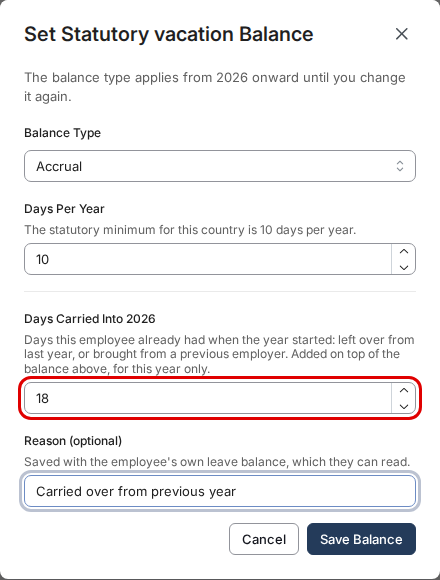
- Select Save Balance. The Carried Over column shows the recorded days, and Remaining includes them.
What employees see
Employees see the carried-over days included in their time off balance. They can also read the reason you enter.
Good to know
- Carried-over days are added to the year's allowance or accrued balance. They do not replace the allowance.
- You can return to the same balance editor to change the number or reason.
- Recording carried-over days does not itself change the balance type.
Still stuck?
Email customer-success@toku.com and we'll help.